错误的标签
来源:1-1 html5页面布局概述

ATLAS3
2017-06-24 12:06:34
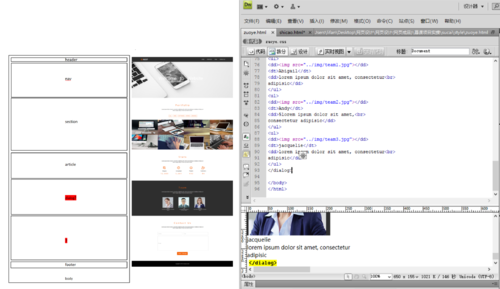
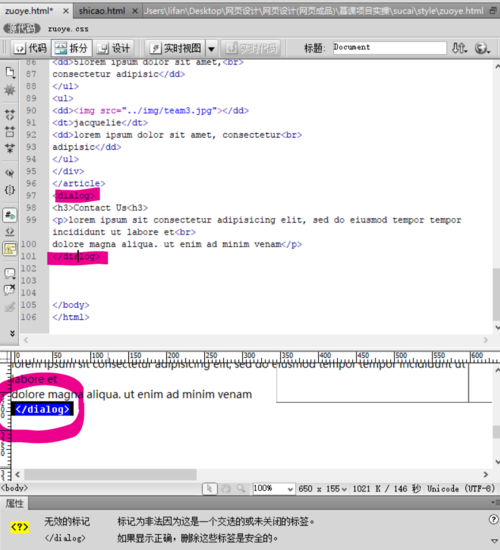
这个网页,这样布局可以吗?到红色标记的地方为什么标签不能用?
写回答
4回答
-

Miss路
2017-06-26
需要在dialog中添加属性:open="open",,即:<dialog open="open">才能显示,但是目前这个标签对浏览器的兼容性不太好,而且有默认的属性,不太好用,不建议使用,如果定义一个块的话建议使用div,这是最常用的方法。祝学习愉快!
0 -
ATLAS3
提问者
2017-06-25
<!DOCTYPE html>
<html>
<head>
<meta charset="UTF-8">
<title>Document</title>
<link href="zuoye.css" rel="stylesheet" type="text/css">
</head>
<body>

<header>
<div>
<a name="logo" href="zuoye.html"><img src="../img/logo.jpg"></a>
<ul>
    <a href="#">HOME</a>
    <a href="#">PORTFOLIO</a>
    <a href="#">TEAM</a>
    <a href="#">CONTACT US</a>
</ul>
</div>
<nav>
<div>
<h1>welcome to website</h1>
<p>lorem ipsum dolor sit amet, consectetur adipiscing elit</p>
</div>
<img src="../img/banner.jpg">
</nav>
</header>


<section>
<h2>portfolio</h2>
<p>lorem ipsum dolor sit consectetur adipisicing elit.sed do eiusmodtempor incididunt ut labore et<br>
<p>dolore magna aliqua. ut enim ad minim veniam</p>
<ul>
<a href="#">ALL</a>
<a href="#">WEB</a>
<a href="#">SOFTWARE</a>
<a href="#">WORKS</a>
<a href="#">BRANDS</a>
</ul>
<img src="../img/portfolio-nav-img.jpg">
</section>

<aside>
<h2>stats</h2>
<p>lorem ipsum dolor sit, consectetur adipisicing elit, sed do eiusmodtempor incididunt ut ladore et<br>
dolore magna aliqua. ut ad minim veniam</p>
<ul>
<dd><img src="../img/stats1.jpg"></dd>
<dd>Margins</dd>
<dt>12,000</dt>
</ul>
<ul>
<dd><img src="../img/stats2.jpg"></dd>
<dd>Completed</dd>
<dt>5,681</dt>
</ul>
<ul>
<dd><img src="../img/stats3.jpg"></dd>
<dd>Projects</dd>
<dt>432</dt>
</ul>
<ul>
<dd><img src="../img/stats4.jpg"></dd>
<dd>Customers</dd>
<dt>86</dt>
</ul>
</aside>
<article>
<div>
<h3>team</h3>
<p>lorem ipsum dolor sit amet, consectetur adipisicing elit, sed do eiusmodtempor in cididunt ut labore et<br>
dolore magna aliqua. ut enim ad minim veniam</p></div>
<div>
<ul>
<dd><img src="../img/team1.jpg"></dd>
<dt>Abigail</dt>
<dd>lorem ipsum dolor sit amet, consectetur<br>
adipisic</dd>
</ul>
<ul>
<dd><img src="../img/team2.jpg"></dd>
<dt>Andy</dt>
<dd>5lorem ipsum dolor sit amet,<br>
consectetur adipisic</dd>
</ul>
<ul>
<dd><img src="../img/team3.jpg"></dd>
<dt>jacquelie</dt>
<dd>lorem ipsum dolor sit amet, consectetur<br>
adipisic</dd>
</ul>
</div>
</article>
<dialog>
<h3>Contact Us<h3>
<p>lorem ipsum sit consectetur adipisicing elit, sed do eiusmod tempor tempor incididunt ut labore et<br>
dolore magna aliqua. ut enim ad minim venam</p>
</dialog>


<footer>
<div><p>copright © 2017.lifangji.cn ALL Rights Reserved</p></div>
</footer>
</body>
</html>
你看看吧
@charset "utf-8"; /* CSS Document */ *{ font-family:"Microsoft YaHei UI"; font-size:14px; margin:0; padding:0; border:none;} a{ text-decoration:none;} ul{ list-style:none;} bady{ width:1490px; height:1490px; margin:0 auto;} header{ background:#2e2e2e; height:50px;} header > div{ width:1200px; margin:0 auto;} header > div > a{ display:block; float:left; margin:10px;} header > div > ul{ float:right; display:block; margin:15px; } header > div > ul > a{ color:#ffffff; padding:15px;} header > nav { width:1490px; margin:0 auto;} header > nav > img{ width:1490px;} header > nav > div{ width:1490px; position:absolute; text-align:center; color:#ffffff; top:350px; } header > nav > div > h1{ font-size:48px;} section{ position:relative; width:1490px; margin:0 auto; text-align:center; line-height:100px; top:800px;} section > h2{ font-size:48px; font-weight:lighter; color:#f26208; margin:80px auto; } section> p{ margin:-60px auto;} section > ul{ width:1490px; margin:60px 550px; } section > ul >a{ display:block; border: 1px solid #f26208; float:left; line-height:20px; margin:50px 10px; color:#f26208; padding:5px; } section > img { width:1490px; } aside{ position:relative; top:900px; width:1490px; margin:0 auto; text-align:center; line-height:80px} aside > h2{ font-size:48px; font-weight:lighter; color:#f26208;} aside > p{ line-height:30px; margin:50px; } aside > div{ } aside > ul { position:relative; display:blaock; float:left; padding:50px; line-height:60px; left:350px;} aside > ul > dt{ font-size:48px; color:#f26208; font-weight:lighter; line-height:50px;} aside > ul > dd{ font-weight:bold;} article{ height:700px; background:#2e2e2e; position: relative; top:1200px; width:1490px; margin:0 auto; } article > div:first-of-type{ position: absolute; width:1490px; text-align:center; } article > div:first-of-type > h3{ width:1490px; font-size:48px; color:#f26208; line-height:220px; font-weight:lighter;} article > div:first-of-type > p{ width:1490px; margin:0 auto; color:#ffffff; line-height:30px; } article > div:last-of-type{ width:1490px; margin:0 auto; padding:350px; } article > div:last-of-type > ul{ position:relative; display:block; float:left; text-align:center; color:#ffffff; margin:0 20px;} footer{ top:300px; background:#000;} footer > div { width:1200px; height:50px; margin:0 auto; } footer > div > p{ color:#ffffff; text-align:center; }0h017-06-26 -
Miss路
2017-06-24
<dialog> 标签是 HTML 5 的新标签。你声明的是html5还是html4呢?必须要声明是html5才行哦。如果还不行的话把你的代码粘贴上来,不完整的代码没有办法为你找问题,粘贴代码。祝学习愉快!
0 -
Miss路
2017-06-24
左侧的画图布局是可以的,但是关于dialog标签,由于你的截图不完整,所以我在你的截图上只看到了结束标签</dialog>,没有看到开始标签<dialog>,是你遗漏了,还是没有截全呢,建议排查一下这个问题。
祝学习愉快!
0h017-06-24
相似问题
错误的标签
回答 2
不居中,也没有鼠标滑过的效果
回答 3