关于页面布局的问题
来源:2-1 html5页面布局(表现层_header)

qq_四非_0
2017-03-30 16:50:00
老师 我想问个问题,为什么我做的网页在自己电脑上显示正常 拷贝去被人电脑上打开布局就乱了,分辨率和浏览器的问题吗?怎么解决?我用的都是百分比。
5回答
-

海纳百川_
2017-03-30
看不到你的代码,只能给你提几点建议。1、页面如果是铺满网页的,建议给每个区域的最外层宽度设为100%。2、最外层盒子内部再定义一个宽度为定值(一定要合适)的盒子,可以使用margin:0 auto;使页面内容都居中显示。3、控制每个元素的位置(即元素与元素之间的间距)时,最好使用margin设置,少用position定位。
1h017-03-31 -
海纳百川_
2017-04-01
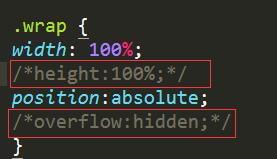 把标注的两句代码注释掉,就有下拉滚动条了。你的问题是只允许整个页面的高度为浏览器的一屏,超出部分隐藏处理。0h017-04-05
 -
qq_四非_0
提问者
2017-04-01
<!DOCTYPE html PUBLIC "-//W3C//DTD XHTML 1.0 Transitional//EN" "http://www.w3.org/TR/xhtml1/DTD/xhtml1-transitional.dtd">
<html xmlns="http://www.w3.org/1999/xhtml">
<head>
<metahttp-equiv="X-UA-Compatible"content="IE=8"><!--以IE8模式渲染-->
<metahttp-equiv="X-UA-Compatible"content="IE=7"><!--以IE7模式渲染-->
<meta http-equiv="Content-Type" content="text/html; charset=utf-8" />
<title>无标题文档</title>
<script src="file:///E|/jQuery/jquery-3.2.0.min.js"></script>
</head>
<style type="text/css">
@media screen and (max-width:980px){
#t1{width:100%}
.t2{width:60%}
}
* { text-align:center;
margin: 0;
padding: 0;
}
body {
font-family: 'Open Sans', sans-serif;
color: #460000;
line-height: 22px;
}
.wrap {
width: 100%;
height:100%;
position:absolute;
overflow:hidden;
}
.head {
height:17%;
width: 66%;
background:#0000CD;
letter-spacing:10px;
margin:10px 17% 15px 17%;
border: 10px groove #039;
overflow:hidden;
text-align:center;
}
.head spen {
color:#FF0;
font-size: 70px;
font-color: #330;
display:inline-block;
text-align: center;
line-height:125px;
vertical-align:super;
}
.head img{
float:left;
width:16%;
height:100%;
}
.left {
height: 79%;
width: 35%;
float:left;
line-height: 100px;
text-align: center;
overflow:hidden;
}
.left-top {
color:#F00;
font-size: 75px;
height: 15%;
background-image:url(left1.jpg);
background-repeat: no-repeat;
background-position:center;
border: 1px solid #000;
text-align:center;
overflow:hidden;
letter-spacing:40px;
}
.left-body {
height:73%;
background:#74B3F1;
font-size: 30px;
line-height: 35px;
text-indent: 60px;
text-align: center;
border: 1px solid #000;
overflow:hidden;
color:#FFF;
}
.left-foot {
height:11%;
background-image:url(leftt.jpg);
background-repeat: no-repeat;
background-position:center;
text-align: center;
line-height:35px;
font-size: 24px;
overflow:hidden;
border: 1px solid #000;
}
.right {
width: 65%;
height:79%;
background: #390;
float:right;
overflow:hidden;
}
.right-top {
height:9%;
background: #663;
border: 1px solid #000;
border-right: none;
width:100%;
float: left;
overflow:hidden;
text-align:center;
letter-spacing:10px;
}
.right-top-l {
width:75%;
background:#0000CD;
float: left;
height: 100px;
text-align:center;
}
.right-top-l p {
font-size: 50px;
text-align: center;
line-height:67px;
color:#F00;
letter-spacing:100px;
}
#right-top-r {
width: 25%;
background:#0000CD;
float: right;
height: 100px;
}
#right-top-r p {
color:#FFF;
font-size: 36px;
text-align: center;
line-height: 67px;
}
.right-foot {
height:60%;
width: 100%;
background: #633;
border: 1px solid #000;
}
.right-foot-t {
width: 100%;
height: 10%;
background: #C6C;
float: left;
border: 1px solid #000;
overflow:hidden;
}
.right-foot-f {
border: 1px solid #000;
width: 100%;
height: 139%;
background: #CC0;
float: left;
overflow:hidden;
}
.gridtable {
height:100%;
width: 100%;
font-size: 35px;
letter-spacing: 20px;
text-align: center;
}
.gridtable th {
border-right: 1px solid #000;
height: 45px;
}
/*.roll ul{ width:100%; height:60px; padding:0px; border:#e1e1e1 solid 1px; overflow:hidden;}
.roll li{ width:100%; height:60px; line-height:0px; overflow:hidden; white-space:nowrap; text-overflow:ellipsis;
font-size:24px;}
.gridtable-roll{
height:60px;
width:100%;
font-size:25px;
text-align:center;
line-height:60px;
}*/
#scrollDiv {
width: 100%;
height: 100%;
min-height: 20px;
line-height: 25px;
border: #ccc 1px solid;
overflow: hidden;
}
#scrollDiv li {
padding-left:10px;
height:70px;
width: 100%;
line-height:15px;
font-size: 25px;
letter-spacing: 10px;
text-align: center;
padding:0;
color:#FFF;
}
.gridtable-roll {
height: 45px;
width: 100%;
font-size: 25px;
letter-spacing: 10px;
text-align: center;
border-bottom: 1px solid #000;
}
</style>
0 -
qq_四非_0
提问者
2017-04-01
<!DOCTYPE html PUBLIC "-//W3C//DTD XHTML 1.0 Transitional//EN" "http://www.w3.org/TR/xhtml1/DTD/xhtml1-transitional.dtd">
<html xmlns="http://www.w3.org/1999/xhtml">
<head>
<metahttp-equiv="X-UA-Compatible"content="IE=8"><!--以IE8模式渲染-->
<metahttp-equiv="X-UA-Compatible"content="IE=7"><!--以IE7模式渲染-->
<meta http-equiv="Content-Type" content="text/html; charset=utf-8" />
<title>无标题文档</title>
<script src="file:///E|/jQuery/jquery-3.2.0.min.js"></script>
</head>
<body background="top.jpg">
<div class="wrap">
<div class="head">
<img src="timg.jpg" width="6%" height="185%"/><spen><strong>云南省农产品质量安全公示牌</strong></spen>
</div>
<div class="left">
<div class="left-top"><strong></strong></div>
<div class="left-body">
<p>信息公告信息公告信息公告信息公告信息公告信息公告信息公告信息公告信息公告信息信息公告信息公告信息公告信息信息公告信息公告信息公告信息信息公告信息公告信息公告信息信息公告信告信息公告告信息公告信息公告信息信息公告信息公告信息公告息公息公信息公信息信息公告信息公告信息</p>
</div>
<div class="left-foot">监督电话:12345678900<br />云南×××××××所监制</div>
</div>
<div class="right">
<div class="right-top">
<div class="right-top-l">
<p><strong>物栏信息</strong></p>
</div>
<div id="right-top-r">
<p><strong>时间</strong></p>
</div>
</div>
<div class="right-foot">
<div class="right-foot-t">
<table class="gridtable">
<tr>
<th width="24%">摊位号</th>
<th width="23%">品名</th>
<th width="34%">判断项目</th>
<th width="19%">结果</th>
</tr>
</table>
</div>
<div class="right-foot-f">
<div id="scrollDiv">
<ul>
<li>
<table class="gridtable-roll">
<tr>
<th width="22%">摊位号</th>
<th width="25%">品名</th>
<th width="34%">判断项目</th>
<th width="20%">结果</th>
</tr>
</table>
</li>
<li>
<table class="gridtable-roll">
<tr>
<th width="22%">摊位号</th>
<th width="25%">品名</th>
<th width="34%">判断项目</th>
<th width="20%">结果</th>
</tr>
</table>
</li>
<li>
<table class="gridtable-roll">
<tr>
<th width="22%">摊位号</th>
<th width="25%">品名</th>
<th width="34%">判断项目</th>
<th width="20%">结果</th>
</tr>
</table>
</li>
<li>
<table class="gridtable-roll">
<tr>
<th width="22%">摊位号</th>
<th width="25%">品名</th>
<th width="34%">判断项目</th>
<th width="20%">结果</th>
</tr>
</table>
</li>
<li>
<table class="gridtable-roll">
<tr>
<th width="22%">摊位号</th>
<th width="25%">品名</th>
<th width="34%">判断项目</th>
<th width="20%">结果</th>
</tr>
</table>
</li>
<li>
<table class="gridtable-roll">
<tr>
<th width="22%">摊位号</th>
<th width="25%">品名</th>
<th width="34%">判断项目</th>
<th width="20%">结果</th>
</tr>
</table>
</li>
<li>
<table class="gridtable-roll">
<tr>
<th width="22%">摊位号</th>
<th width="25%">品名</th>
<th width="34%">判断项目</th>
<th width="20%">结果</th>
</tr>
</table>
</li>
<li>
<table class="gridtable-roll">
<tr>
<th width="22%">摊位号</th>
<th width="25%">品名</th>
<th width="34%">判断项目</th>
<th width="20%">结果</th>
</tr>
</table>
</li>
<li>
<table class="gridtable-roll">
<tr>
<th width="22%">摊位号</th>
<th width="25%">品名</th>
<th width="34%">判断项目</th>
<th width="20%">结果</th>
</tr>
</table>
</li>
<li>
<table class="gridtable-roll">
<tr>
<th width="22%">摊位号</th>
<th width="25%">品名</th>
<th width="34%">判断项目</th>
<th width="20%">结果</th>
</tr>
</table>
</li>
<li>
<table class="gridtable-roll">
<tr>
<th width="22%">摊位号</th>
<th width="25%">品名</th>
<th width="34%">判断项目</th>
<th width="20%">结果</th>
</tr>
</table>
</li>
<li>
<table class="gridtable-roll">
<tr>
<th width="22%">摊位号</th>
<th width="25%">品名</th>
<th width="34%">判断项目</th>
<th width="20%">结果</th>
</tr>
</table>
</li>
</ul>
</div>
</div>
</div>
</div>
<script type="text/javascript">
//滚动插件
(function($){
$.fn.extend({
Scroll:function(opt,callback){
//参数初始化
if(!opt) var opt={};
var _this=this.eq(0).find("ul:first");
var lineH=_this.find("li:first").height(), //获取行高
line=opt.line?parseInt(opt.line,10):parseInt(this.height()/lineH,10), //每次滚动的行数,默认为一屏,即父容器高度
speed=opt.speed?parseInt(opt.speed,18):1500, //卷动速度,数值越大,速度越慢(毫秒)
timer=opt.timer?parseInt(opt.timer,18):6000; //滚动的时间间隔(毫秒)
if(line==0) line=1;
var upHeight=0-line*lineH;
//滚动函数
scrollUp=function(){
_this.animate({
marginTop:upHeight
},speed,function(){
for(i=1;i<=line;i++){
_this.find("li:first").appendTo(_this);
}
_this.css({marginTop:0});
});
}
//鼠标事件绑定
this.hover(function(){
clearInterval(timerID);},function(){
timerID=setInterval("scrollUp()",timer);
}).mouseout();
}
})
})(jQuery);
$(document).ready(function(){
$("#scrollDiv").Scroll({line:4,speed:500,timer:1000});
});
</script>
<script>
setInterval("document.getElementById('right-top-r').innerHTML = new Date().toLocaleString();", 1000);
</script>
</body>
</html>
0 -
海纳百川_
2017-03-31
建议你将代码传上来吧,否则不知道具体的情况,无法帮助到你
0h017-04-11
相似问题