JS交互代码报错
来源:5-6 作业题

weixin_慕慕2499132
2020-09-24 12:37:41
结果是referenceError,代码如下
<!DOCTYPE html>
<html>
<head>
<meta charset="UTF-8">
<meta name="viewport" content="width=device-width, initial-scale=1.0">
<title>endTermPractice</title>
<link type="text/css" rel="stylesheet" href="css/style.css" />
<link type="text/css" rel="stylesheet" href="css/cssreset.css" />
<link type="text/css" rel="stylesheet" href="css/animate.css" />
<script type="text/javascript" src="js/setting.js"></script>
</head>
<body>
<section id="blockOne">
<header class="blockOne_heading">
<div class="logo">
<div></div>
<p class="smallText">H5实战页面</p>
</div>
<div class="rightNav">
<span><a class="smallText smallText--active">实战课程</a></span>
<span><a class="smallText">商业案例</a></span>
<span><a class="smallText">课程体系</a></span>
<span><a class="smallText">集成环境</a></span>
<span class="space"><a class="smallText">云端学习</a></span>
<span class="highlight"><a class="smallText">即刻学习</a></span>
</div>
</header>
<div class="blockOne_text">
<p class="bigText blockOne_text_bigText">实战课程重磅上线</p>
<p class="smallText blockOne_text_smallText">一键云学习,还在等待什么?</p>
</div>
</section>
<section id="blockTwo">
<div class="blockTwo_text">
<p class="bigText blockTwo_text_bigText">每门课都是真实商业案例</p>
<div class="redline"></div>
<p class="smallText smallText--top blockTwo_text_smallTextTop">真实案例,真实场景,在实战中实践、操作、调试</p>
<p class="smallText blockTwo_text_smallTextBottom">大牛带你体验真实开发流程,所有开发过程一一为你呈现</p>
</div>
<div class="blockTwo_imgArea">
<div class="one"></div>
<div class="two blockTwo_imgArea_two"></div>
<div class="thr blockTwo_imgArea_thr"></div>
</div>
</section>
<section id="blockThr">
<div class="blockThr_imgArea"></div>
<div class="blockThr_content">
<div class="blockThr_content_text">
<p class="bigText blockThr_content_text_bigText">强大的语言课程体系支持</p>
<div class="redline"></div>
<p class="smallText blockThr_content_text_smallText">学习环境与课程轻松对接,安装、调试、写入、部署、运行,一站式解决,让你体验开发全流程</p>
<p class="icon blockThr_content_text_icon">
<span class="icons">HTML5</span>
<span class="icons">PHP</span>
<span class="icons">JAVA</span>
<span class="icons">Python</span>
<span class="icons">Node.js</span>
</p>
</div>
</div>
</section>
<section id="blockFour">
<div class="blockFour_text">
<p class="bigText blockFour_text_bigText">省去本地复杂的环境搭建</p>
<div class="redline"></div>
<p class="smallText blockFour_text_smallText">你可以告别在虚拟机中调试开发了</p>
</div>
<div class="blockFour_imgArea blockFour_imgArea_all">
<div class="imgArea one">
<div class="image"></div>
<p class="smallText">实战课程集成开发环境</p>
</div>
<div class="imgArea two">
<div class="image"></div>
<p class="smallText">内置终端命令行</p>
</div>
<div class="imgArea thr">
<div class="image"></div>
<p class="smallText">编译你的应用程序</p>
</div>
<div class="imgArea four">
<div class="image"></div>
<p class="smallText">通过云端服务输出效果</p>
</div>
</div>
</section>
<section id="blockFive">
<div class="blockFive_imgArea blockFive_imgArea_a"></div>
<div class="blockFive_text">
<p class="bigText blockFive_text_bigText">云端学习可以这样简单</p>
<div class="whiteline"></div>
<p class="smallText blockFive_text_smallText">看视频,敲代码,一气呵成。结合慕课网为你提供的云端学习工具,所见即所得。从此学习不一样</p>
</div>
</section>
<section class="blockSix">
<button type="button" id="learnMore">继续了解学习体验</button>
</section>
<footer>
<div>
<span><a class="smallText">网站首页</a></span>
<span><a class="smallText">人才招聘</a></span>
<span><a class="smallText">联系我们</a></span>
<span><a class="smallText">高校联盟</a></span>
<span><a class="smallText">关于我们</a></span>
<span><a class="smallText">讲师招聘</a></span>
<span><a class="smallText">意见反馈</a></span>
<span><a class="smallText">友情链接</a></span>
</div>
<p>Copyright © 2015 imooc.com All rights Reserved | 京ICP备 13046642号-2</p>
</footer>
<div id="outline" class="outline">
<a href="javascript:;" class="outline_items">实</a>
<a href="javascript:;" class="outline_items">商</a>
<a href="javascript:;" class="outline_items">课</a>
<a href="javascript:;" class="outline_items">集</a>
<a href="javascript:;" class="outline_items">云</a>
</div>
</body>
</html>
CSS
/* 通用小号文字样式 默认白色*/
.smallText {
font-size: 15px;
color: #fff;
}
/* 通用大号文字样式 默认白色 */
.bigText {
font-size: 40px;
color: #fff;
font-weight: bold;
}
/* 通用红线 */
.redline {
height: 1px;
width: 50px;
border-bottom: 3px solid #ff0000;
margin: 0 auto;
}
/* 通用白线 */
.whiteline {
height: 1px;
width: 50px;
border-bottom: 3px solid #fff;
margin: 0 auto;
}
/* 通用区域块样式 */
section {
width: 100%;
height: 640px;
}
/* 第一块区域开始 */
#blockOne {
background-image: url(../img/sc1.jpg);
background-size: cover;
background-repeat: no-repeat;
position: relative;
}
/* header部分开始 */
#blockOne header {
height: 55px;
width: 100%;
overflow: hidden;
position: fixed;
/* 设置相对浏览器窗口定位 */
z-index: 99;
}
.blockOne_heading--active {
background-color: #fff;
opacity: 80%;
}
/* 左 */
#blockOne header .logo {
width: 170px;
float: left;
position: relative;
}
#blockOne header .logo div {
width: 40px;
height: 40px;
background-image: url(../img/logo.png);
background-size: cover;
margin-left: 10px;
margin-top: 10px;
display: inline-block;
}
#blockOne header .logo p {
font-weight: bold;
display: inline-block;
position: absolute;
top: 50%;
margin-top: -7.5px;
margin-left: 10px;
}
/* 右 */
#blockOne header .rightNav {
width: 630px;
height: 100%;
float: right;
margin-right: 27px;
}
#blockOne header .rightNav span {
display: inline-block;
width: 80px;
padding: 0 8px;
line-height: 40px;
margin-top: 7.5px;
text-align: center;
}
#blockOne header .rightNav .space {
margin-right: 10px;
}
.rightNav span:first-child {
font-weight: bold;
}
#blockOne header .rightNav .highlight {
background-color: #f01400;
border-radius: 5px;
}
.blockOne_heading--active {
background-color: #fff;
opacity: 80%;
}
.smallText--active {
color: black;
}
/* header部分结束 */
.blockOne_text {
width: 340px;
height: 95px;
position: absolute;
top: 50%;
margin-top: -47.5px;
left: 50%;
margin-left: -170px;
text-align: center;
}
.blockOne_text .smallText {
margin-top: 20px;
}
/* 第一块区域结束 */
/* 第二块区域开始 */
#blockTwo {
background-color: #f3f5f7;
position: relative;
overflow: hidden;
}
/* 上部分文字内容设定 开始*/
.blockTwo_text {
height: 146px;
width: 464px;
text-align: center;
position: absolute;
left: 50%;
margin-left: -232px;
margin-top: 87px;
}
.blockTwo_text .bigText {
color: #07111b;
}
.blockTwo_text .smallText {
color: #07111b;
}
.blockTwo_text .redline {
margin-top: 30px;
margin-bottom: 20px;
}
/* 上部分文字内容设定结束 */
/* 下部分图片内容设定开始 */
.blockTwo_imgArea {
height: 390px;
width: 808px;
position: absolute;
bottom: 0;
left: 50%;
margin-left: -404px;
}
.blockTwo_imgArea .one {
height: 100%;
width: 100%;
background-image: url(../img/sc2.png);
background-size: cover;
background-repeat: no-repeat;
position: absolute;
z-index: 1;
/* 注意z-index仅在定位元素下有效 */
}
.blockTwo_imgArea .two {
height: 100%;
width: 100%;
background-image: url(../img/sc2-1.png);
background-size: contain;
background-repeat: no-repeat;
background-position: center;
position: absolute;
z-index: 5;
}
.blockTwo_imgArea .thr {
height: 200px;
width: 250px;
background-image: url(../img/sc2-2.png);
background-repeat: no-repeat;
background-position-x: -100px;
background-size: cover;
position: absolute;
z-index: 3;
right: 95px;
top: 80px;
}
/* 第二块区域结束 */
/* 第三块区域开始 */
#blockThr {
background-color: #2b333b;
position: relative;
overflow: hidden;
}
.blockThr_imgArea {
height: 620px;
width: 40%;
background-image: url(../img/sc3.png);
background-repeat: no-repeat;
background-size: contain;
margin-top: 10px;
margin-left: 100px;
display: inline-block;
}
.blockThr_content {
width: 40%;
height: 365px;
display: inline-block;
position: absolute;
top: 200px;
margin-left: 100px;
}
.blockThr_content .redline {
margin-top: 30px;
margin-bottom: 20px;
margin-left: 0;
}
.blockThr_content .icon {
margin-top: 120px;
height: 70px;
}
.icons {
display: inline-block;
width: 70px;
font-weight: bold;
line-height: 70px;
margin-right: 30px;
text-align: center;
}
/* 逐一设置圈圈的样式 */
.blockThr_content .icon span:nth-child(1) {
color: #17b0f2;
border: 5px solid #244557;
border-radius: 50%;
}
.blockThr_content .icon span:nth-child(2) {
color: #7888fd;
border: 5px solid #424d76;
border-radius: 50%;
}
.blockThr_content .icon span:nth-child(3) {
color: #dd605a;
border: 5px solid #6b4146;
border-radius: 50%;
}
.blockThr_content .icon span:nth-child(4) {
color: #22bdba;
border: 5px solid #29535f;
border-radius: 50%;
}
.blockThr_content .icon span:nth-child(5) {
margin-right: 0;
color: #769e4b;
border: 5px solid #3e4e40;
border-radius: 50%;
}
/* 第三块区域结束 */
/* 第四块区域开始 */
#blockFour {
background-color: #f3f5f7;
overflow: hidden;
/* 所有毗邻的两个或更多盒元素的margin将会合并为一个margin共享之,第一个子元素的margin-top设置会影响父元素,给父元素设置overflow:hidden解决 */
}
.blockFour_text {
width: 480px;
height: 130px;
text-align: center;
margin: 0 auto;
margin-top: 80px;
}
.blockFour_text .bigText,
.blockFour_text .smallText {
color: #07111b;
}
.blockFour_text .bigText {
margin-bottom: 30px;
}
.blockFour_text .smallText {
margin-top: 20px;
}
.blockFour_imgArea {
width: 1022px;
height: 120px;
margin: 0 auto;
margin-top: 80px;
text-align: center;
}
.blockFour_imgArea .imgArea {
height: 100%;
width: 170px;
margin-right: 110px;
display: inline-block;
}
.blockFour_imgArea .imgArea .image {
width: 75px;
height: 90px;
margin: 0 auto;
}
/* 最后一张图的右边距清零 */
.blockFour_imgArea div:last-child {
margin-right: 0;
}
/* 插入图片 */
.blockFour_imgArea .one .image {
background-image: url(../img/sc4-1.png);
background-repeat: no-repeat;
background-size: contain;
background-position: center;
}
.blockFour_imgArea .two .image {
background-image: url(../img/sc4-2.png);
background-repeat: no-repeat;
background-size: contain;
background-position: center;
}
.blockFour_imgArea .thr .image {
background-image: url(../img/sc4-3.png);
background-repeat: no-repeat;
background-size: contain;
background-position: center;
}
.blockFour_imgArea .four .image {
background-image: url(../img/sc4-4.png);
background-repeat: no-repeat;
background-size: contain;
background-position: center;
}
.blockFour_imgArea .imgArea .smallText {
color: #07111b;
margin-top: 10px;
}
/* 第四块区域结束 */
/* 第五区域开始 */
#blockFive {
background-color: #b01e2b;
overflow: hidden;
}
.blockFive_imgArea {
width: 210px;
height: 210px;
margin: 0 auto;
margin-top: 95px;
background-image: url(../img/sc5-1.png);
background-repeat: no-repeat;
background-size: cover;
}
.blockFive_text {
width: 700px;
height: 150px;
margin: 0 auto;
text-align: center;
margin-top: 50px;
}
.blockFive_text .whiteline {
margin-top: 25px;
margin-bottom: 30px;
}
/* 第五区域结束 */
/* 第六区域开始 */
.blockSix {
height: 200px;
width: 100%;
background-color: #fff;
position: relative;
}
#learnMore {
height: 60px;
width: 240px;
font-size: 18px;
position: absolute;
left: 50%;
margin-left: -120px;
top: 50%;
margin-top: -30px;
background-color: transparent;
border: 1px solid #707070;
border-radius: 3px;
}
/* 第六区域结束 */
/* 页脚部分开始 */
footer {
background-color: #000;
width: 100%;
height: 100px;
overflow: hidden;
text-align: center;
}
footer div {
width: 630px;
height: 30px;
margin: 0 auto;
margin-top: 30px;
}
footer div span {
margin-right: 30px;
}
footer div span:last-child {
margin-right: 0;
}
footer div span .smallText {
font-size: 12px;
line-height: 30px;
}
footer p {
color: #787d82;
font-size: 14px;
}
#outline {
width: 50px;
position: fixed;
top: 40%;
right: 0px;
text-align: center;
box-shadow: 0px 3px 4px rgba(0, 0, 0, 0.5);
z-index: 3;
}
#outline .outline_items {
display: block;
height: 30px;
width: 50px;
line-height: 30px;
font-size: 14px;
padding-top: 10px;
background-color: white;
color: black;
}
#outline a:first-child {
padding-top: 15px;
}
#outline a:last-child {
padding-bottom: 15px;
}
CSS动画
/* 第一区域动画开始 */
.blockOne_heading {
transition: all 1s;
}
.blockOne_heading_animate_init {
opacity: 0;
transform: translate(0, -100%);
}
.blockOne_heading_animate_done {
opacity: 1;
transform: translate(0, 0);
transition-delay: 1s;
}
.blockOne_text_bigText {
transition: all 1s;
}
.blockOne_text_bigText_animate_init {
opacity: 0;
transform: translate(0, 100%);
}
.blockOne_text_bigText_animate_done {
opacity: 1;
transform: translate(0, 0);
}
.blockOne_text_smallText {
transition: all 1s;
}
.blockOne_text_smallText_animate_init {
opacity: 0;
transform: translate(0, 100%);
}
.blockOne_text_smallText_animate_done {
opacity: 1;
transform: translate(0, 0);
transition-delay: 1s;
}
/* 第一区域动画结束 */
/* 第二区域动画开始 */
.blockTwo_text_bigText {
transition: all 1s;
}
.blockTwo_text_bigText_animate_init {
opacity: 0;
transform: translate(0, 100%);
}
.blockTwo_text_bigText_animate_done {
opacity: 1;
transform: translate(0, 0);
}
.blockTwo_text_smallTextTop {
transition: all 1s;
}
.blockTwo_text_smallTextTop_animate_init {
opacity: 0;
transform: translate(0, 100%);
}
.blockTwo_text_smallTextTop_animate_done {
opacity: 1;
transform: translate(0, 0);
transition-delay: 1s;
}
.blockTwo_text_smallTextBottom {
transition: all 1s;
}
.blockTwo_text_smallTextBottom_animate_init {
opacity: 0;
transform: translate(0, 100%);
}
.blockTwo_text_smallTextBottom_animate_done {
opacity: 1;
transform: translate(0, 0);
transition-delay: 1s;
}
.blockTwo_imgArea_two {
transition: all 0.5s;
}
.blockTwo_imgArea_two_animate_init {
opacity: 0;
}
.blockTwo_imgArea_two_animate_done {
opacity: 1;
transition-delay: 1s;
}
.blockTwo_imgArea_thr {
transition: all 1s;
}
.blockTwo_imgArea_thr_animate_init {
opacity: 0;
transform: translate(0, 310px);
}
.blockTwo_imgArea_thr_animate_done {
animation: imgMove 0.5s linear;
animation-delay: 2s;
transition-delay: 2s;
}
/* 动画播放时会突然向下偏移再回复,原因未知 */
@keyframes imgMove {
0% {
transform: translate(0, 300px);
opacity: 0;
}
40% {
transform: translate(0, -20px);
opacity: 1;
}
70% {
transform: translate(0, 20px);
opacity: 1;
}
100% {
transform: translate(0, 0);
opacity: 1;
}
}
/* 第二区域动画结束 */
/* 第三区域动画开始 */
.blockThr_content_text_bigText,
.blockThr_content_text_smallText {
transition: all 1s;
}
.blockThr_content_text_bigText_animate_init,
.blockThr_content_text_smallText_animate_init {
opacity: 0;
transform: translate(0, 100%);
}
.blockThr_content_text_smallText_animate_done {
transition-delay: 1s;
}
.blockThr_content_text_bigText_animate_done,
.blockThr_content_text_smallText_animate_done {
opacity: 1;
transform: translate(0, 0);
}
.blockThr_content_text_icon_animate_init {
opacity: 0;
transform: translate(0, 100%);
transition-duration: 1s;
}
.blockThr_content_text_icon_animate_done {
opacity: 0;
animation: iconMove .5s;
animation-delay: 2s;
animation-fill-mode: forwards;
}
@keyframes iconMove {
0% {
opacity: 0;
transform: translate(0, 100%);
}
40% {
opacity: 1;
transform: translate(0, 0);
}
60% {
opacity: 1;
transform: translate(0, 10px);
}
80% {
opacity: 1;
transform: translate(0, -10px);
}
100% {
opacity: 1;
transform: translate(0, 0);
}
}
/* 第三区域结束 */
/* 第四区域开始 */
.blockFour_text_bigText,
.blockFour_text_smallText,
.blockFour_imgArea_all {
transition: all 1s;
}
.blockFour_text_bigText_animate_init,
.blockFour_text_smallText_animate_init {
opacity: 0;
transform: translate(0, 100%);
}
.blockFour_text_bigText_animate_done,
.blockFour_text_smallText_animate_done {
opacity: 1;
transform: translate(0, 0);
}
.blockFour_text_smallText_animate_done {
transition-delay: 1s;
}
.blockFour_imgArea_all_animate_init {
opacity: 0;
transform: scale(0.2);
}
.blockFour_imgArea_all_animate_done {
opacity: 1;
transform: scale(1);
}
.blockFive_imgArea_a {
transition: all 0.4s;
}
.blockFive_imgArea_a_animate_init {
transform: scale(0.2);
}
.blockFive_imgArea_animate_a_done {
transform: scale(0.2);
}
.blockFive_text_bigText,
.blockFive_text_smallText {
transition: all 1s;
}
.blockFive_text_bigText_animate_init,
.blockFive_text_smallText_animate_init {
opacity: 0;
transform: translate(0, 100%);
}
.blockFive_text_bigText_animate_done,
.blockFive_text_smallText_animate_done {
opacity: 1;
transform: translate(0, 0);
transition-delay: 0.5s;
}
.blockFive_text_smallText_animate_done {
transition-delay: 1.5s;
}
JS
// 包装获取元素
var getElem = function(selector) {
return document.querySelector(selector);
}
// 包装获取所有元素
var getAllElem = function(selector) {
return document.querySelectorAll(selector);
}
// 包装获取样式
var getCls = function(element) {
return element.getAttribute('class');
}
// 为元素添加样式
var addCls = function(element, cls) {
var baseCls = getCls(element);
if (baseCls.indexOf(cls) === -1) { //如未添加新class名
return element.setAttribute('class', element.getAttribute('class') + ' ' + cls);
}
}
var delCls = function(element, cls) {
var baseCls = getCls(element);
if (baseCls.indexOf(cls) !== -1) { //如添加了新class名
element.setAttribute('class', baseCls.replace(cls, ' '));
}
}
// 第一步:为所有动画元素添加init
var screenAnimateElements = {
'#blockOne': ['.blockOne_heading', '.blockOne_text_bigText', '.blockOne_text_smallText'],
'#blockTwo': ['.blockTwo_text_bigText', '.blockTwo_text_smallTextTop', '.blockTwo_text_smallTextBottom', '.blockTwo_imgArea_two', '.blockTwo_imgArea_thr'],
'#blockThr': ['.blockThr_content_text_bigText', '.blockThr_content_text_smallText', '.blockThr_content_text_icon'],
'#blockFour': ['.blockFour_text_bigText', '.blockFour_text_smallText', '.blockFour_imgArea_all'],
'#blockFive': ['.blockFive_imgArea_a', '.blockFive_text_bigText', '.blockFive_text_smallText']
};
var setScreenAnimateInit = function(screenCls) {
var screen = document.querySelector(screenCls); //获取当前屏元素
var animateElements = screenAnimateElements[screenCls]; //获取需要播放动画元素
for (var i = 0; i < animateElements.length; i++) {
var element = document.querySelector(animateElements[i]);
var elementClassName = element.getAttribute('class');
// 原来的class名+新添加的class名去除字符串中第一个. 点
element.setAttribute('class', elementClassName + ' ' + animateElements[i].substr(1) + '_animate_init ');
}
}
// 设置播放屏幕内元素动画
var playScreenAnimateDone = function(screenCls) {
var animateElements = screenAnimateElements[screenCls]; //获取需要播放动画元素
for (var i = 0; i < animateElements.length; i++) {
var element = document.querySelector(animateElements[i]);
var elementClassName = element.getAttribute('class');
// 原来的class+新添加的class
element.setAttribute('class', elementClassName.replace('_animate_init', '_animate_done'));
}
}
window.onload = function() {
console.log('onload');
for (k in screenAnimateElements) {
setScreenAnimateInit(k);
}
}
// 获取导航栏元素
var header = document.getElementsByClassName('blockOne_heading');
// 第二布:滚动条滚动播放动画
window.onscroll = function() {
// 注意:使用documentElement而不是body
var top = document.documentElement.scrollTop;
console.log(top);
if (top >= 600) {
header.setAttribute('class', header.getAttribute('class') + ' ' + 'blockOne_heading--active');
} else {
header.setAttribute('class', header.getAttribute('class').replace('blockOne_heading--active', ' '));
}
if (top > 0) {
playScreenAnimateDone('#blockOne');
}
if (top >= 600) {
playScreenAnimateDone('#blockTwo');
}
if (top >= 600 * 2) {
playScreenAnimateDone('#blockThr');
}
if (top >= 600 * 3) {
playScreenAnimateDone('#blockFour');
}
if (top >= 600 * 4) {
playScreenAnimateDone('#blockFive');
}
}
1回答
-
同学你好,代码中有以下几个问题:
1、引入js的路径放在第head标签里面,如下:
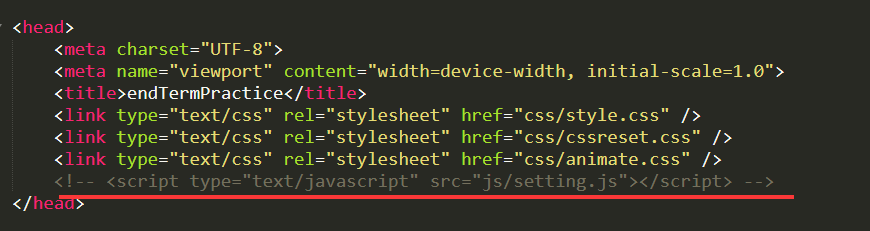
浏览器在读取代码的时候,是从头往下读,先读取了js文件,再去读取下面html标签,会获取不到标签。
建议把js放在body标签的下面,这样浏览器读取完html再去js,就能获取到标签了。
参考下图:

2、通过document.getElementsByClassName("")获取出来的标签不是唯一的,所以需要指定下标签,参考下图:

通过下标去指定header标签。
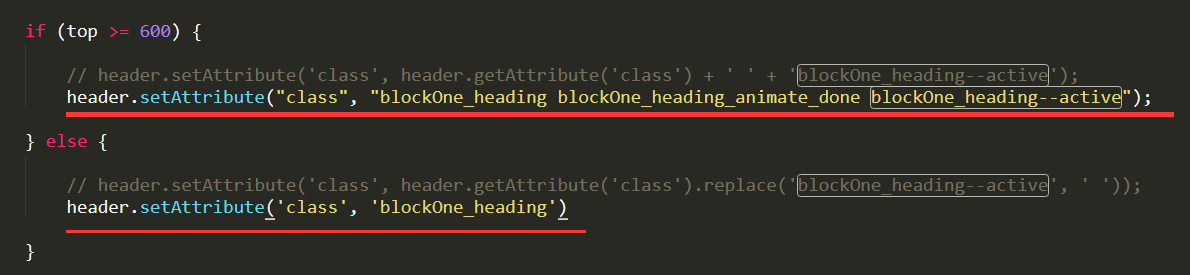
3、通过 header.setAttribute('class', header.getAttribute('class') + ' ' + 'blockOne_heading--active');这种方式给header标签添加类名,效果会实现,但是在滑动滚动条的时候,会在header的class里面一直拼接,如下:

建议添加的类名固定住,只要条件满足,就把这个标签的类名更改,参考下图:
如果帮助到了你,欢迎采纳,祝学习愉快!
加油!
0

相似问题