CSS 基础布局 2-9 编程练习
来源:2-10 编程练习
qq_诶姆_0
2017-08-10 09:45:43
<!doctype html>
<html>
<head>
    <meta charset="UTF-8">
    <title>Document</title>
    <style type="text/css">
        *{
            margin: 0;
            padding:0;
        }
        .head{
            width: 100%;
            height:100px;
            background: black;
        }
        .photo{
            float:left;
        }
        .words{

            float:right;
            color: white;
            margin-right: 50px;
        }
        .words span{
            line-height: 100px;
        }
        .foot{
            width: 100%;
            height:100px;
            background: black;
            text-align: center;
        }
        .foot span{
            line-height: 100px;
            color: white;
        }
        .body{
            width: 100%;
            height:800px;
            background-color: #4169e1;
            margin: 0 auto;
        }
        .left{
            width: 500px;
            height: 100px;
            background-color: yellow;
            float: left;

        }
        .right{
            width: 400px;
            height: 100px;
            background-color: red;
            float: right;
        }
    </style>
</head>
<body>
    <div class="head">
        <div class="photo">
            <img src="http://climg.mukewang.com/58c0d2d900016ce303000100.png"/>
        </div>
        <div class="words">
            <span>课程 职业 路径 实战 猿问 手记</span>
        </div>
    </div>
    <div class="body">
        <div class="left">
            这是左半部分
        </div>
        <div class="right">
            这是右半部分
        </div>
    </div>
    <div class="foot">
        <span>网站首页   企业合作   人才招聘   联系我们   常见问题   友情链接</span>
    </div>
</body>
</html>
老师 我有个问题,第一个是关于head 和 foot 的样式里面 我是利用空格使他们有间距的 可是好像无论打多少个空格 都只能显示一个,这怎么操作?第二个问题是在body标签里 我想先分左右两部分,可为什么float:left;后它并不靠左呢?原因是什么?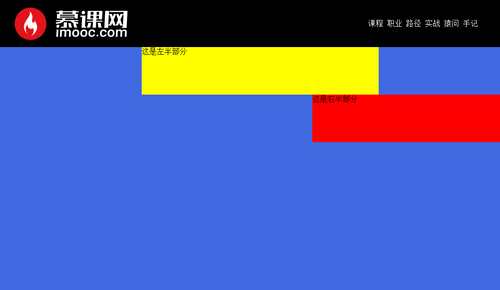
写回答
4回答
-

怎么都被占用了呢
2017-08-10
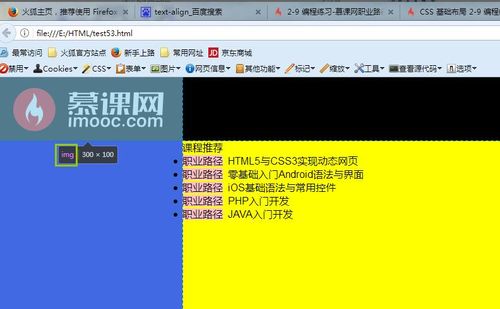
你选中的是img,不是类名为photo的div呀
 0h017-08-10
 -
qq_诶姆_0
提问者
2017-08-10
老师,我刚才把.photo的height去掉了,显示的效果如下
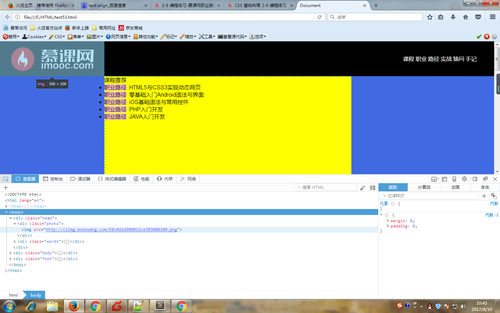 和您的不一样啊,并不是103,我用了两个浏览器试过了的都是1000
 -
怎么都被占用了呢
2017-08-10
是包含着logo图片的盒子,
 ,一时手误请谅解。0h017-08-10
 -
怎么都被占用了呢
2017-08-10
1、浏览器解析的机制就是如此:无需使用键盘敲多少空格,都只会显示一个,你可以使用空格实体试下
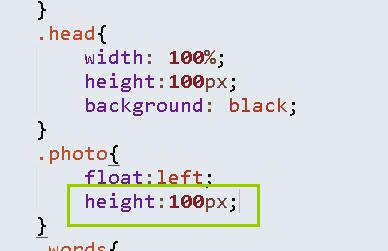
2、向左浮动飘不过去,是因为包含logo图片的盒子高度太大,挡住了,建议修改如图:
 0h017-08-10
相似问题