老师,我这个一直有横向滚动条
来源:4-3 编程练习

慕九州4495990
2019-05-27 06:30:33
<!DOCTYPE html>
<html>
<head>
    <meta charset="UTF-8">
<title></title>
<style type="text/css">
*{
padding: 0px;
margin: 0px;
}
.container{
width: 100%;
height: 4043px;
/*background: url(http://climg.mukewang.com/59c9f7ce0001839219034033.png) center top no-repeat;*/
/*position: relative;*/
}
.container .image{
width: 100%;
height: 100%;
}
.container .leftelement{
width: 220px;
height: 360px;
background: url(http://climg.mukewang.com/5a3383c70001f1b702240364.png) left top no-repeat;
float: left;
position: fixed;
top: 50%;
left: 0px;
margin-top: -180px;

}
.container .rightelement{
width: 220px;
height: 360px;
background: url(http://climg.mukewang.com/5a3383d00001a3dd02240364.png) right top no-repeat;
float: right;
position: fixed;
top: 50%;
right: 0px;
margin-top: -180px;
}
</style>
</head>
<body>
<div class="container">

<div class="iamge">
<img src="http://climg.mukewang.com/59c9f7ce0001839219034033.png">
</div>
<div class="leftelement">

</div>

<div class="rightelement">

</div>

</div>

</body>
</html>
写回答
1回答
-

好帮手慕夭夭
2019-05-27
你好同学,因为iamge中的图片原图比较宽度,当电脑屏幕小的时候,图片超出屏幕,就会出现横向滚动条。可以给图片设置一个宽度,让它在不同屏幕下都相对于浏览器100%显示:
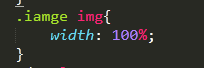
代码效果实现的不错,继续加油,祝学习愉快 ,望采纳。
0

相似问题